HowTos
Using AllStarLink with VK2RNS
Why AllStarLink
AllStarLink (ASL) is a Radio over IP (ROIP) solution based on the open source software PBX Asterisk.
It is an alternative to other ROIP solutions such as Echolink and IRLP in that is designed for use with analog FM radios and repeaters. It is not directly comparable to other the various digital modes such as DMR, D-Star etc.
The reason AllStarLink was chosen as the primary ROIP technology for use at the HADARC club 2M repeater VK2RNS was it is open source, has superior audio quality due to a wide choice of codecs and has less rigid network requirements / limitations.
AllStarLink also has basic compatibility with Echolink and can participate in the Echoloink network.
VK2RNS AllStarLink Network Design
A simple implementation of AllStarLink just requires a connected computer running AllStarLink software, an internet connection and a sound card interface to a radio / repeater.
A limitation of the internet connection at the VK2RNS Storey Park location is that the service is over the mobile network which uses CGNAT. This essentially means it is not possible to receive incoming connections via the internet. It is possible to make outgoing connections.
The solution to this problem has been to implement an AllStarLink node on a cloud hosted linux server. This server has a public IP address and can receive incoming connections as well as make outgoing connections.
The AllStarLink node at Storey Park has a permanent connection which it establishes outbound the the cloud server. Users on the internet connect to the cloud server and the audio is linked through to Storey Park.
AllStarLink Account
Before you can participate in AllStarLink you need to have an account. If you don’t have an account go to AllStarLink and select Login/Sign Up then Signup. Follow the instructions to get an account.
This account can then be used to log in with the vatious computer and mobile apps or to get an ID to set up an AllStartLink node.
Connecting to VK2RNS
The cloud server has the primary node number for VK2RNS which is 57272. The on-site node at Storey Park is node number 564022. Generally users just connect to node 57272.
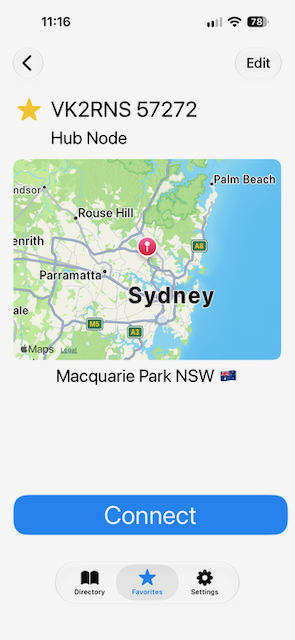
The cloud server is also connected to the Echolink network as VK2RNS-R or Echolink node number 611366.
You can connect inbound using another Allstar node or you can use one of a number of Computer or Mobile apps.
Outbound Connections from VK2RNS
Outbound connections can be done via a Web interface however acccess to this is not generally available.
You can also use DTMF tones.
For example to connect to the VK6 AllStar Regional Hub at node number 42482
*3 42482
To disconnect
*1 42482
AllStarLink Apps
macOS
Windows
AllStar Web Transceiver - Microsoft Store
QSO One - Free client for AllStarLink, EchoLink, IAX Direct, DMR, System Fusion, and M17
iOS
Android
AllStar Web Transceiver for Android — WT, Direct IAX2, and Node Mode
QSO One - Free client for AllStarLink, EchoLink, IAX Direct, DMR, System Fusion, and M17
Building your own AllStar Node
It is possible to build to build your own AllStar node and connect to VK2RNS using that.
The software will run on a Linux based computer. Many nodes are built using a Raspberry Pi and a sound card interface. For more information look at AllStarLink V3.